How to turn off Demo Mode on a Samsung washing machine
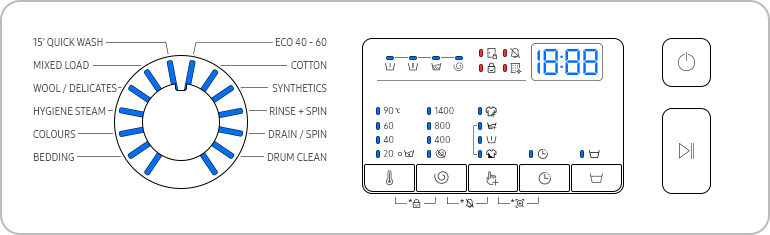
If your Samsung washing machine's control panel is unresponsive or you're unable to select a washing cycle, it may be in demo mode—a feature designed for retail demonstrations. Learn how to deactivate demo mode and restore full functionality to your appliance.
1. Why is my Samsung washing machine in demo mode?
Demo mode is a built-in feature on Samsung washing machines that allows retailers to showcase the appliance's features without operating a full wash cycle. While useful in stores, demo mode can accidentally remain active after purchase, preventing you from using the washing machine normally.
- In demo mode, the washing machine's display appears to operate, but no actual washing cycles run.
- The control panel becomes unresponsive, making it impossible to select cycles or adjust settings.
- Once activated, demo mode remains enabled even after powering off and on again.
2. How to identify demo mode on your Samsung washing machine
The appearance of demo mode varies depending on your washing machine's control panel type. Check for the following signs:
- On LED panel models, all display lights will be illuminated.
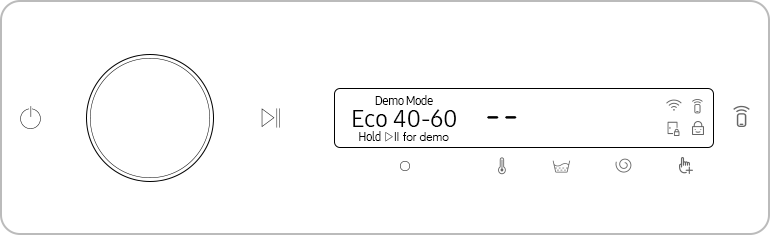
- On AI panel models, the display will show "demo mode."
- For some models, the display may prompt you to continue or exit demo mode after powering on.
3. How to deactivate demo mode on your Samsung washing machine
Follow these steps to deactivate demo mode on your Samsung washing machine. Note that the exact button combination may vary depending on your model.
- Locate the Temp and Options buttons on your washing machine's control panel.
- Press and hold both the Temp and Options buttons simultaneously for approximately 10 seconds.
- The display should change, indicating that demo mode has been deactivated.
For some models, you may need to press the Temp and Spin buttons instead. If the above steps don't work, consult your user manual for model-specific instructions.
4. Additional things to check
If demo mode is still active after following the steps above, consider the following:
- Ensure the washing machine is powered on before attempting to deactivate demo mode.
- Verify that you're pressing the correct buttons simultaneously for 10 seconds.
- Check if your model requires a different button combination, such as Temp and Spin.
5. Supported Samsung washing machine models
Demo mode and deactivation methods apply to most Samsung washing machines, including models from the following series:
- Samsung WF45R6100
- Samsung WF50R6100
- Samsung WF55R6100
- Samsung WF60R6100
For model-specific details, refer to your user manual or contact Samsung Support.
6. Related Samsung support topics
Thank you for your feedback!
Please answer all questions.